2026 / Healthtech
eHealth: unified clinical platform
Product architecture and interface design to unify public and private healthcare operations in a dense, modular platform shaped around real clinical workflows.
The project started from a recurring tension in healthcare systems: public operations need depth, traceability, and strict protocols; private operations need speed, commercial clarity, and less friction in daily service. Treating those contexts as separate products would create technical debt and an inconsistent experience. The work was shaped around a different hypothesis: one architecture could serve both worlds if the interface was modular, configurable, and built around actual operational flow.
Research before screens
Discovery was organized around three user profiles: clinical staff, front desk teams, and management. The goal was not to collect a long list of screens, but to identify which problems remained true regardless of institution type.
For doctors, the central friction was the ratio between screen time and patient time. Fragmented systems forced professionals to move across tabs, recover vital signs, search history, and fill long forms while trying to stay present in the consultation. For reception and triage, the critical point was safe patient identification, visual control over the schedule, and fewer duplicate records. For managers, the problem was latency: decisions depended on asynchronous reports when operations needed real-time visibility.
This triangulation defined the product focus: improve the intake flow and the clinical care flow. The interface stopped being treated as an isolated electronic medical record and became an operational layer for the whole clinic.
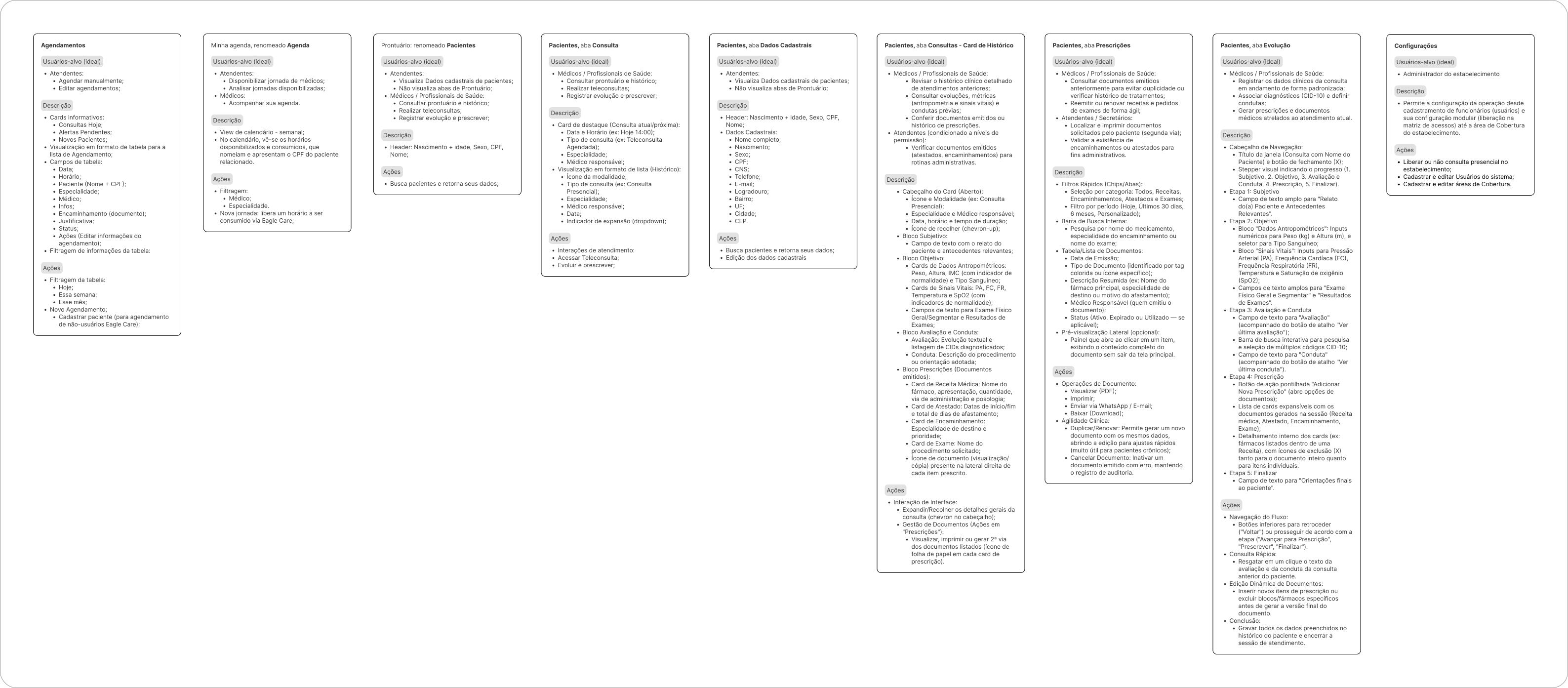
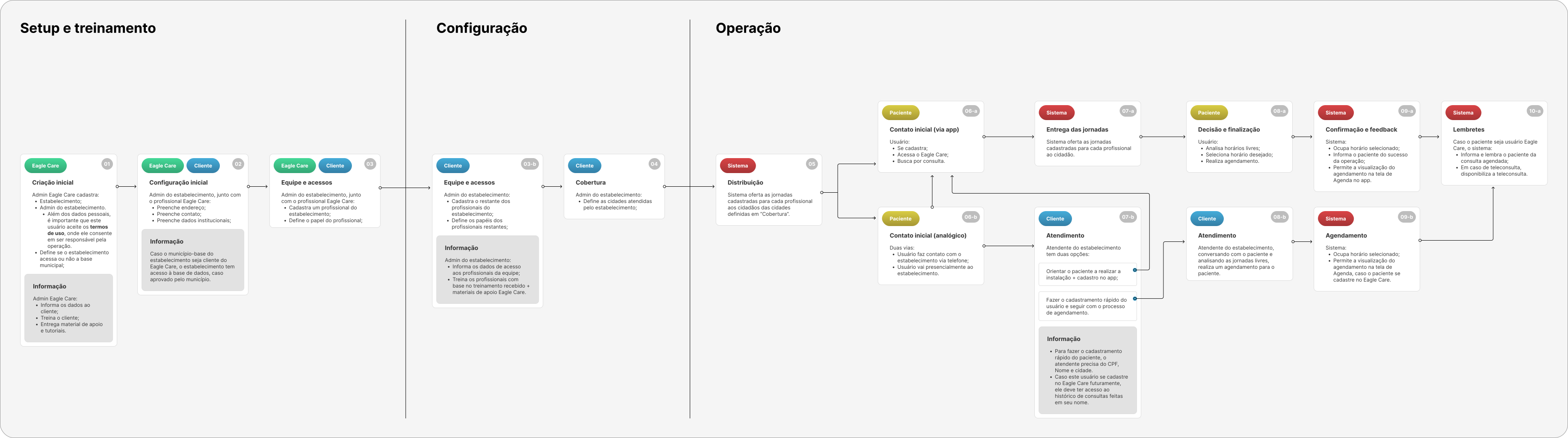
Before designing final layouts, the work moved through a functionality map. It clarified what had to exist, which modules depended on earlier decisions, and how development could move in stages without losing sight of the full product.
One base for two contexts
The product challenge was to unify Eagle Care, already consolidated in municipal public health management, with eHealth, a new branch for private clinics and hospitals. The strategic decision was to avoid splitting the codebase and instead design a shared platform where permissions, modules, and interface states could absorb operational differences.
The visual direction follows that choice. Instead of a generic medical look, the project adopts a utilitarian dashboard approach: clear contrast, typographic hierarchy, predictable components, and little decorative noise. Material Design 3 appears less as an aesthetic reference and more as system discipline: consistent behavior, accessibility, clear states, and a component grammar that can scale.
The result is an interface that can hide, reveal, or reorganize functionality according to user profile without feeling patched together. The same structure supports the rigor of public service and the speed expected by a private clinic.
Schedule as command center
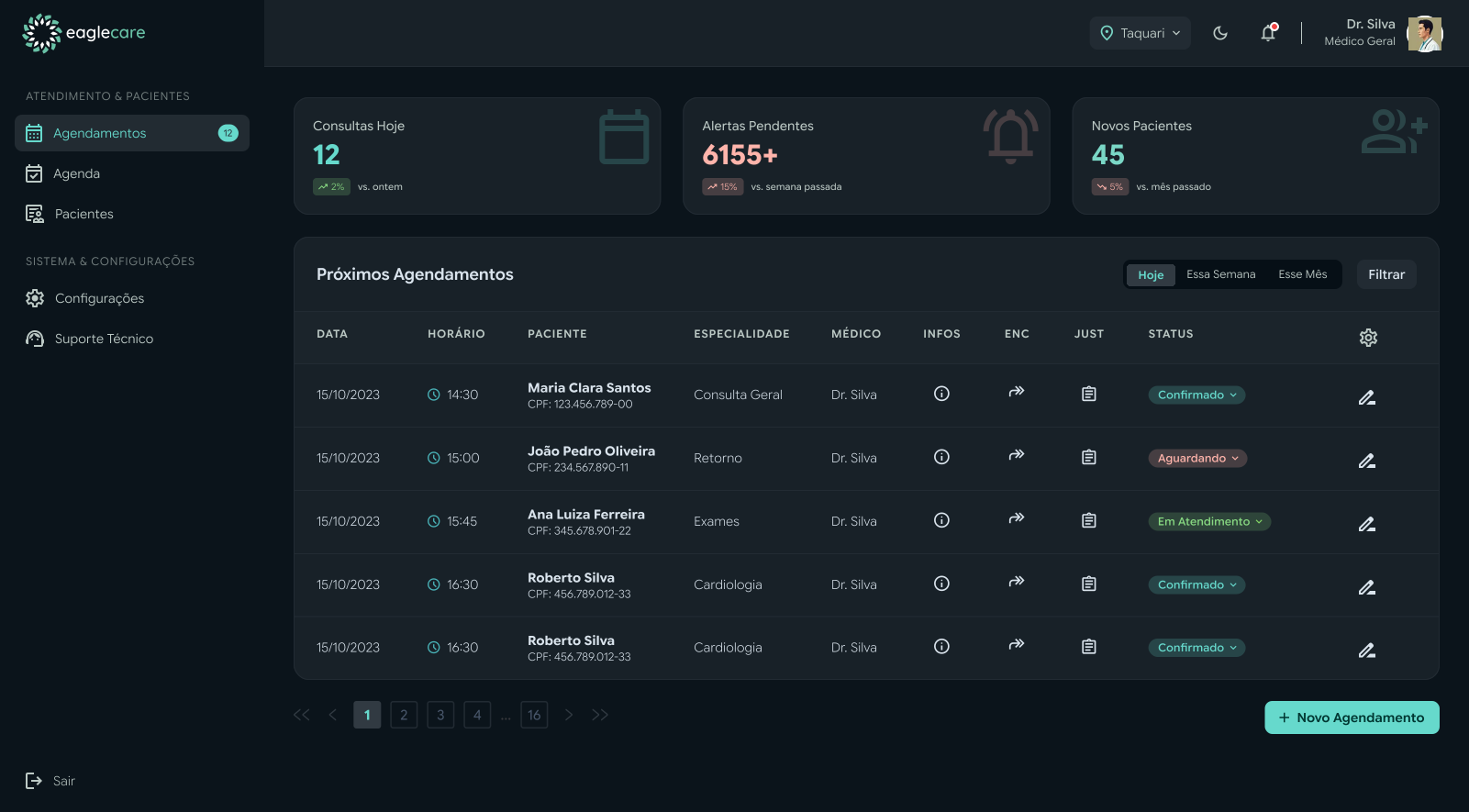
Scheduling was treated as the highest-impact operational surface. It concentrates volume, queue, status, patient identification, and risk signals. The architecture therefore prioritizes fast reading: KPIs at the top, time filters, a logically ordered table, and metadata compressed through iconography.
The patient ID appears in the primary reading layer not as a bureaucratic detail, but as an error-prevention mechanism. In legacy systems, duplicate records often start with small shortcuts. Here, the interface brings verification to the surface.
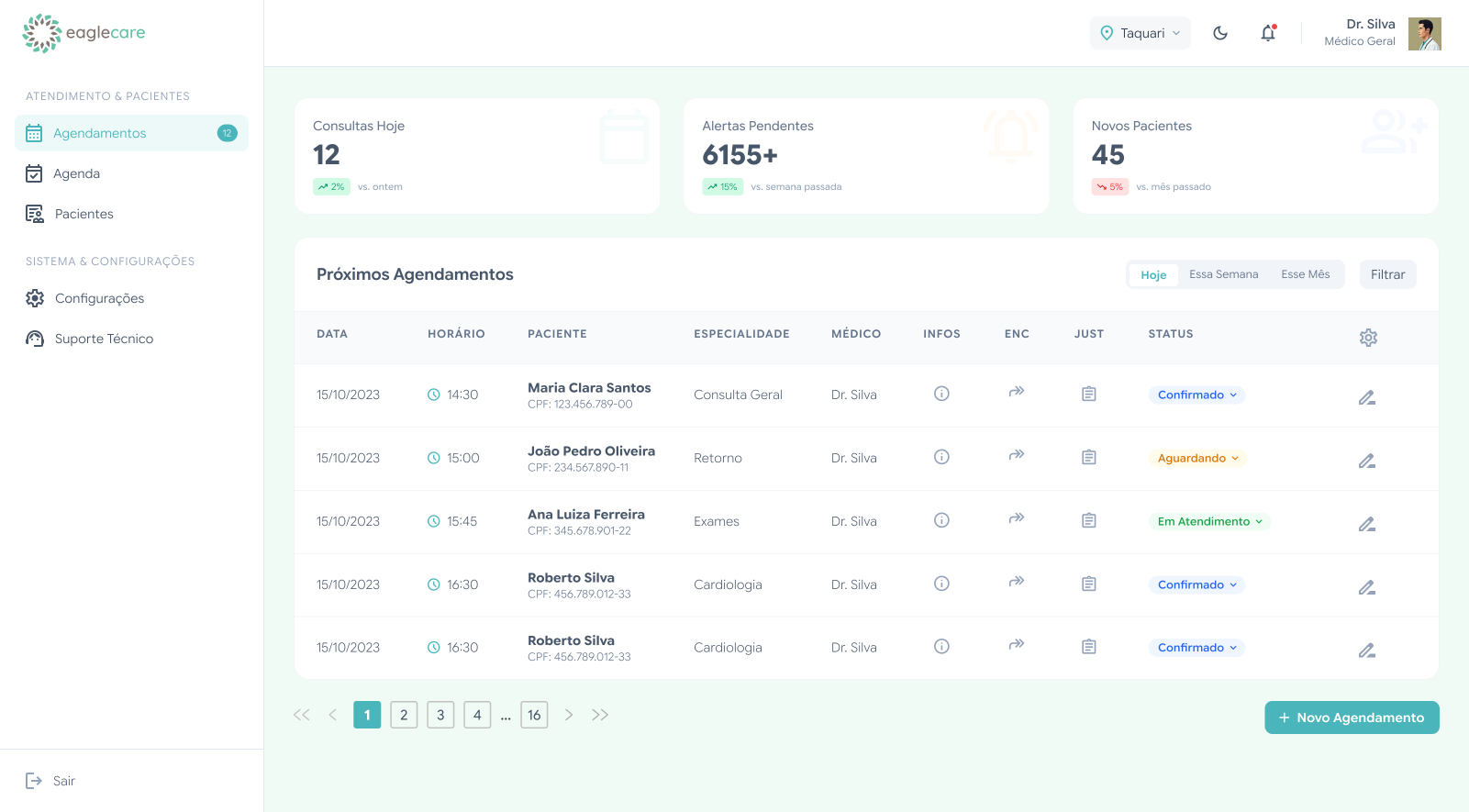
The dark version was not a visual garnish. It came from a real usage condition: night shifts, low-light environments, and long sessions. Dark mode works as an ergonomic decision, reducing visual fatigue in contexts where the tool stays open for hours.
A record that follows clinical reasoning
During the consultation, the priority changes. The interface needs to support diagnostic thinking, not compete with it. The medical record was structured to keep critical data visible and reduce lateral navigation during care.
Information such as age, weight, height, BMI, allergies, and blood type remains anchored at the top. This decision reduces context switching in sensitive moments, such as dosage calculation, prescriptions, or contraindication checks. Tabs separate consultations, documents, and medications without breaking the continuity of care.
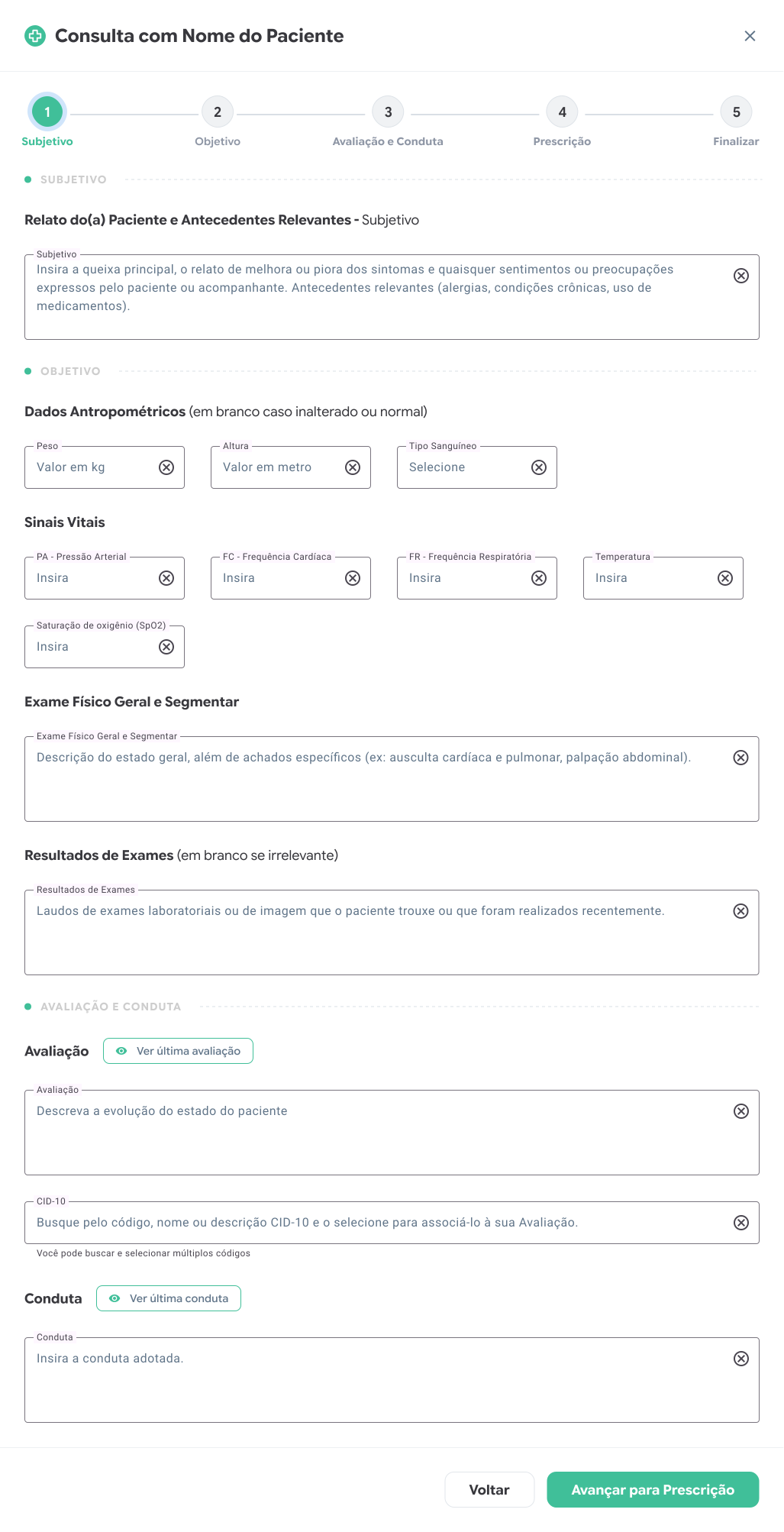
SOAP was used as the mental structure of the screen: Subjective, Objective, Assessment, and Plan. Instead of forcing doctors to translate their reasoning into the system, the interface gets closer to the natural order of a consultation.
Density without overload
Healthcare is a high-density context. The issue is not having too much information; the issue is showing everything at once. For that reason, clinical history was designed with progressive disclosure. The screen presents enough metadata to guide search, but only expands detail when there is intent.
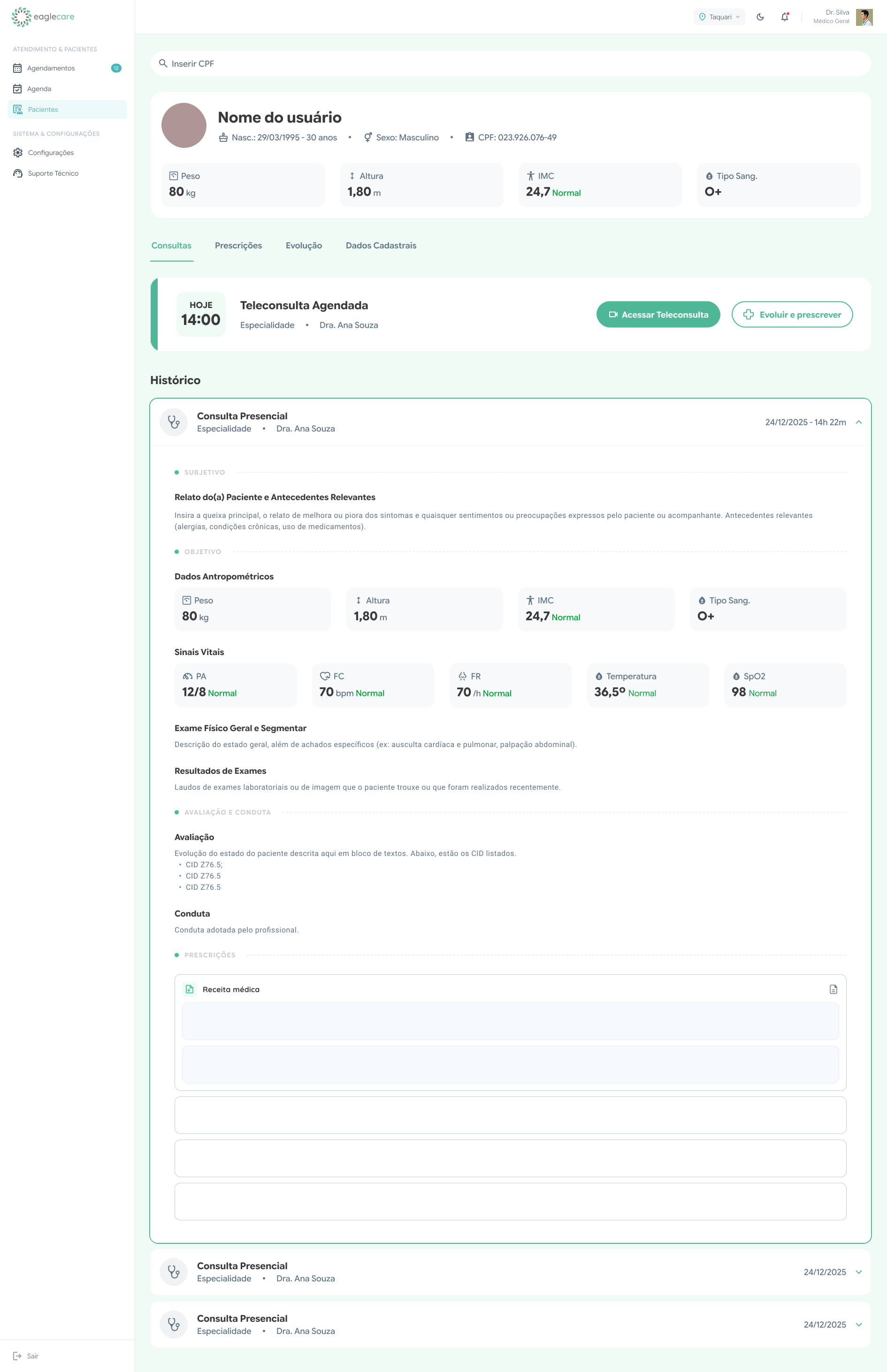
This pattern also creates a foundation for future evolution. Specialties, documents, prescriptions, and telehealth modules can be added without redesigning the main screen, because the architecture already separates context, action, and history.
What this case shows
The value of the project is less about a single screen and more about the coherence of the process. Research identified universal friction. Strategy avoided duplicating products. Architecture connected operations, medical records, and management. The interface translated all of that into components that reduce clicks, make status visible, and let professionals focus on what matters.
The next iterations mapped in the process follow the same logic: AI transcription to reduce typing during anamnesis, decoupled triage so data can be prefilled before the consultation, and stronger indicators to support business decisions and public policy. Instead of adding technology as a flashy layer, the planned evolution shifts mechanical work from the user to the system.